Anika Bajaj
· Updated 9 Jul 2025 · 3 min read
On this page
To unlock some advanced features and extensions on Zopping, you would need to configure a Google Maps API key on the Zopping Dashboard or the app.
What is a Google Maps API Key and why is it necessary?
Google Maps API Key is a private alphanumeric text provided by Google. You can use your private Google Maps API Key to unlock some of the Google Maps location functionalities on your online store and provide better experience to your customers.
Some of the applications of using Google Maps API Key in your online store include, collecting your customers’ delivery locations, charging different delivery fees based on the delivery location of your customer, displaying your store location to your customers, etc.
How can I get a Google Maps API Key?
Google Maps API Key is available on Google Maps Platform, which is a product of Google Cloud. To get started, you need to create an account on Google Cloud. A valid Google Cloud account provides you with access to the Google Maps Platform along with several other Google Cloud products.
Once you have a valid Google Cloud account, follow the below steps to create a Google Maps Platform account.
- Once you are logged into your Google Cloud console, navigate to the Google Maps Platform from the side menu bar.
- Create a new Google Maps project.
- Set up a billing account for this project.
- Link your Google Maps project to the newly created billing account.
Things that needs to be done get a valid and functioning Google Maps API Key
- You should have a valid billing account setup for Google Maps Platform. Having a Google Cloud Console billing account won’t be sufficient.
- Your billing account needs to have a credit card linked. Google verifies your credit card by deducting a nominal amount (it will be refunded typically in a day or so).
Once you have a valid Google Maps Platform project and a billing account associated with it, follow the below steps to find your Google Maps API Key.
- Login to your Google Maps Platform account.
- Click on Credentials from the menu bar.
- Under the API Keys section, click on Show Key.
- This shows a pop-up with the value of your Google Maps API Key.
Where to configure Google Maps API Key in Zopping?
Before you configure your Google Maps API key, ensure that the following APIs are enabled. These are the APIs that are used in Zopping. Not having any of these APIs enabled can hamper the functionality of your online store.
- Geocoding API, helps you find the latitude and longitude of your customer’s delivery location.
- Maps JavaScript API: Helps you render a Google Map on your online store or the dashboard.
- Maps SDK for Android, Helps you render a Google Map on your Android mobile app.
- Places API: Auto-suggests landmarks on your online store.
Once you have the above APIs enabled, login to your Zopping Dashboard or Admin App
Login to Admin Panel
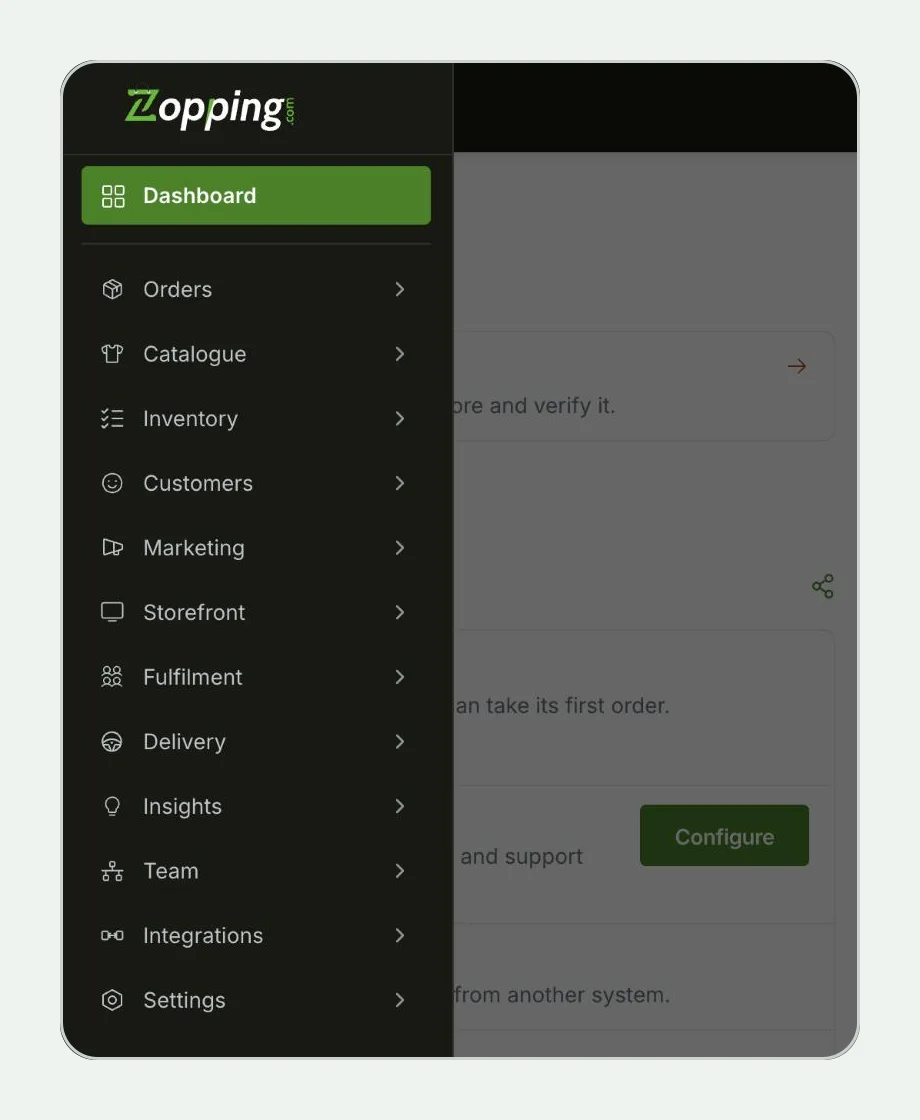
Step 1
- Click On Settings
- Click On API Integration
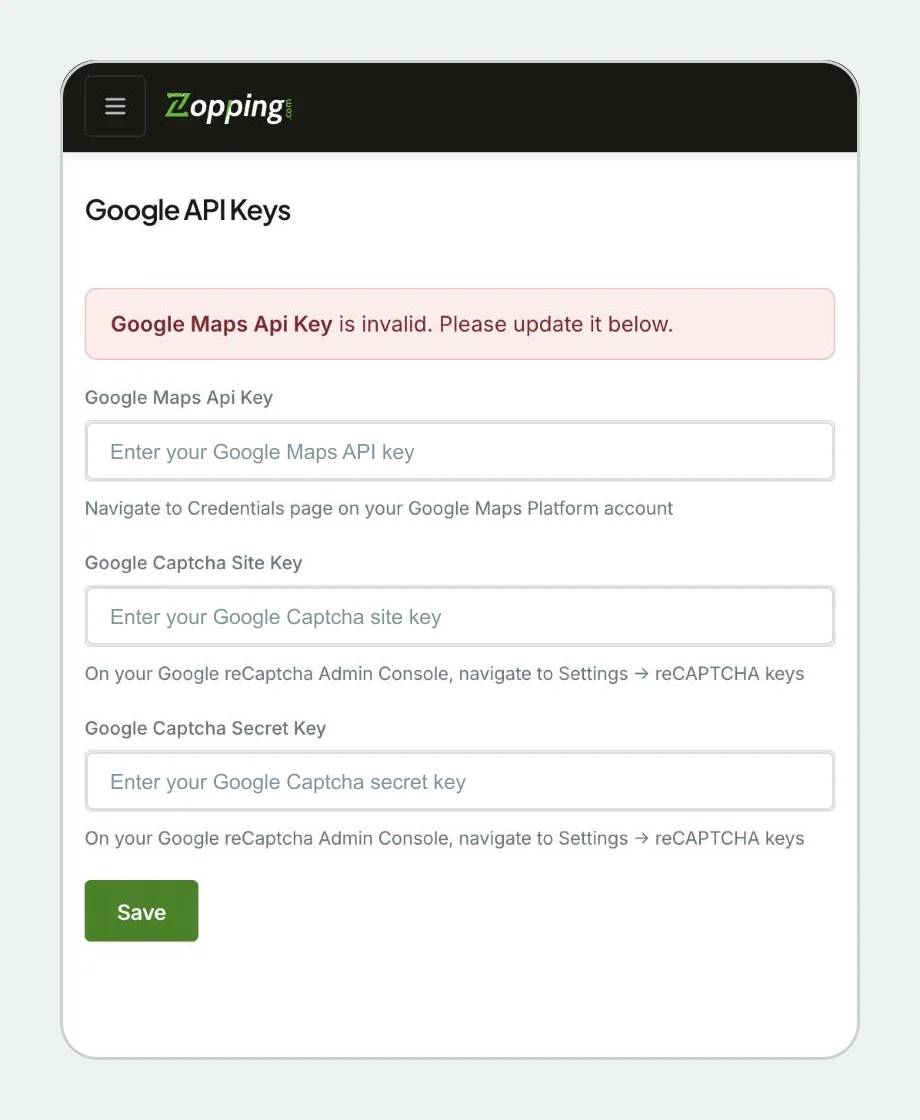
Step 2
- You will find a name of Google API key. Paste the Google map API Key here and hit save.
How much does a Google Maps API Key cost?
Google Maps API Key is priced based on the number of times the APIs are utilized. Each API has a different rate. Refer to the Google Maps pricing page to understand how different APIs are priced.
However, Google gives $200 free credit every month, which is sufficient for a small and medium business that receives anything around 1000 orders a month. Any billing above $200 is deducted from your credit card. You also have an option to set budgets and alerts so that you can always stay within the free credit limit given by Google and stay alerted when you get close to it.
For any further support related to configuring Google Maps API Key on Zopping, please write to us on support@zopping.com
Share this article