Zopping
PricingEnterpriseBlog
All articles

Customer Engagement & Loyalty

How to use Abandoned Cart extension in Zopping?

When a user adds products to their shopping cart but for some reason they did not proceed to checkout, this scenario is referrred as Abandoned Cart. Lot of ecommerce companies face this issue and it is a prevalent cause of concern to brands and retailers. Zopping allows you to retarget and remind customers to visit…

How to use Abandoned Cart extension in Zopping?
AB

Anika Bajaj

21 Apr 2025 · Updated 26 Jun 2025 · 3 min read

On this page
  1. Why do I need the Abandoned Cart Extension?
  2. Prerequisites?
  3. How to Install the Abandoned Cart Extension on Zopping?
  4. How will this change affect my online store?
  5. What happens when I uninstall this extension?

When a user adds products to their shopping cart but for some reason they did not proceed to checkout, this scenario is referrred as Abandoned Cart. Lot of ecommerce companies face this issue and it is a prevalent cause of concern to brands and retailers. Zopping allows you to retarget and remind customers to visit your online store and complete the purchase. This is achieved through the Abandoned Cart extension.

Why do I need the Abandoned Cart Extension?

This extension will allow you to notify your customers to resume their shopping experience if there are any products added to the cart but have not been purchase.

Prerequisites?

  1. If you wish to send out notifications via email, you need to have a SMTP configuration set up for your Zopping account. Follow this blog to know more about how to setup SMTP for your online store.
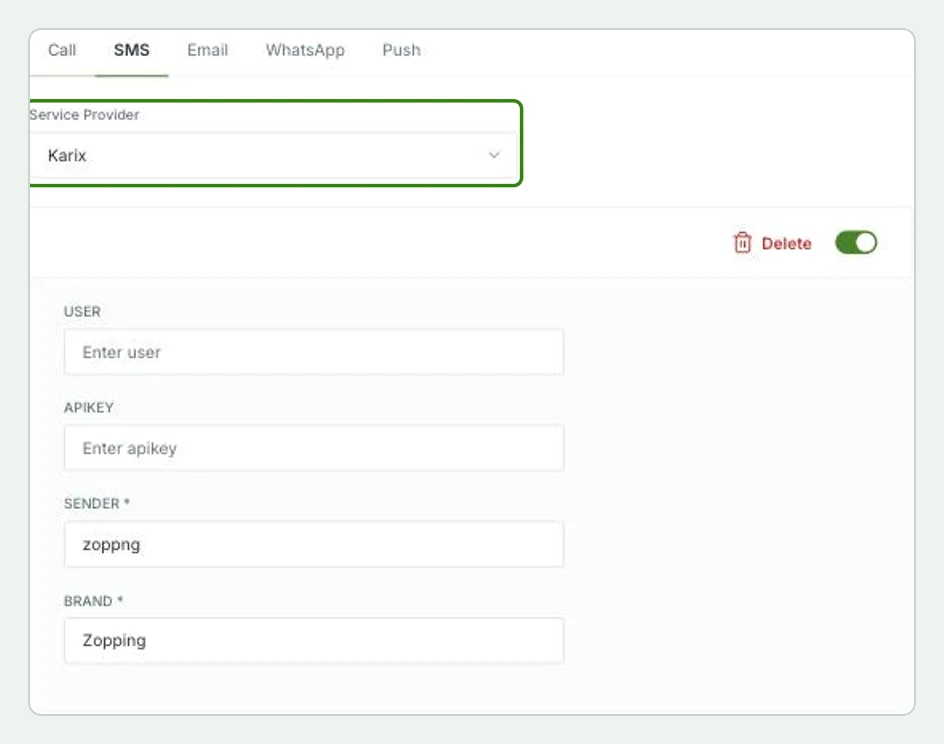
  2. If you wish to send out notifications via SMS, you need to have an SMS gateway (eg, twilio, Whispir, TextMagic, etc.) set up for your Zopping Account. Navigate to Settings > Communication > SMS and select and configure the service provider accordingly.
  1. If you wish to send out push notifications for your mobile app users, you need to have a Firebase account set up for your Zopping Account.

How to Install the Abandoned Cart Extension on Zopping?
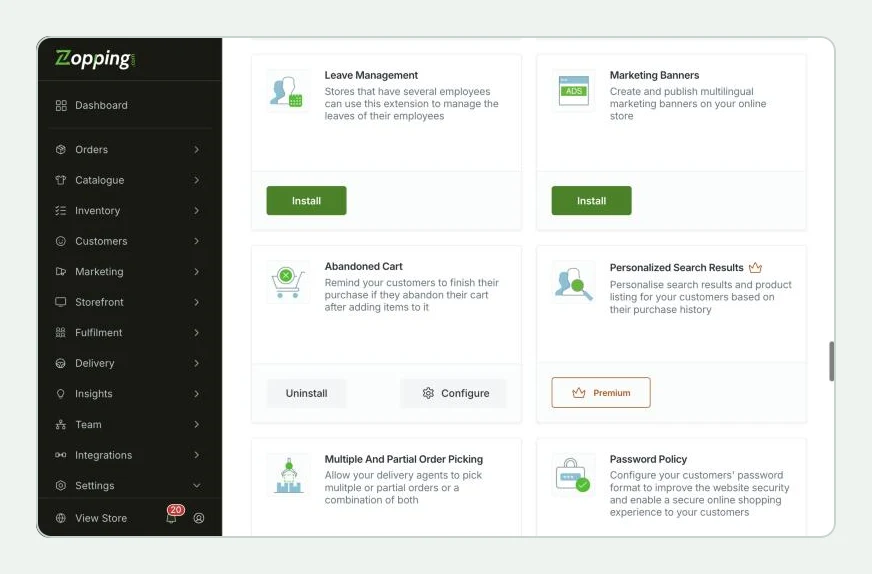
  1. Navigate to Settings > Extensions > Online Store section. Here you will find the Abandoned Cart extension window as shown below.

  2. Click Install on the window, and add the extension to your website.

  3. After installing the Abandoned Cart extension, navigate to the Extensions > Installed section. You will find the same extension in this window. Click on the Configure option.

  4. Once you land on the Abandoned Cart page, you will see a Notification Types options field. Select any/ all of the mediums (Email, SMS or Push Notification) through which you would like to nudge your customers to complete their purchase.
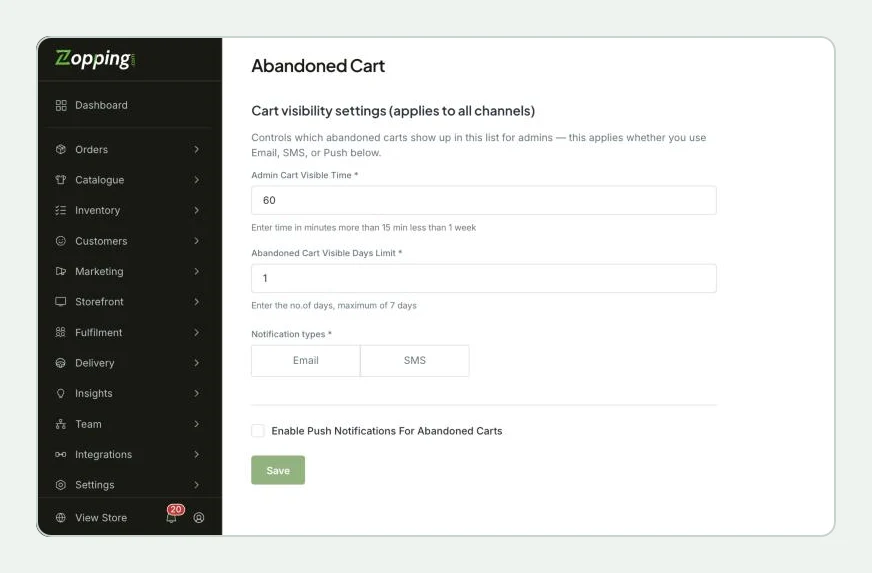
  1. In the field below, named Notification Time, you can define the minutes of inactivity (customer has not added/removed any product from the cart OR moved to checkout page) after which the system will send a notification to the user to resume shopping.
  2. Click on Save to save the changes.

How will this change affect my online store?

  1. When a user logs into their profile in your online store and adds products to their shopping cart. Lets say for some reason, the user has not made any changes to the cart or proceeded to checkout for a considerable amount of time.
  2. In this scenario, according to the time limit configured as shown above, the user will receive a message/ notification to remind them to visit your online store and complete placing their order.

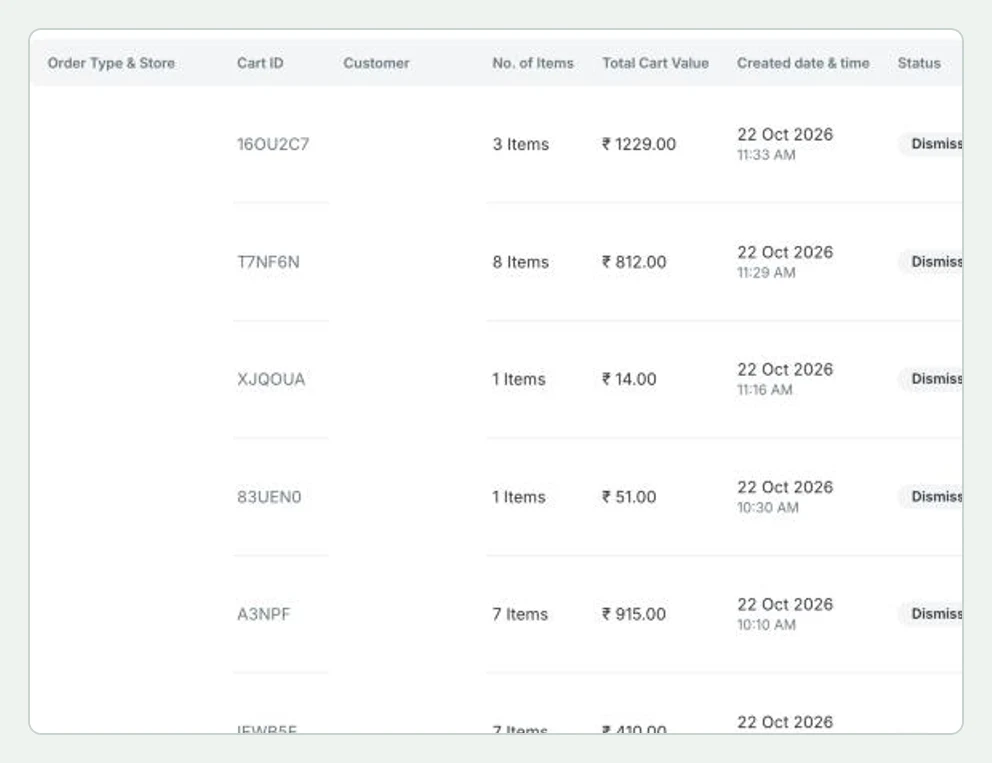
As the store owner, you can follow these carts under Orders > Abandoned Carts. The list shows each cart with its customer, number of items, total value, created time and status, so your team can also follow up with the customer directly.
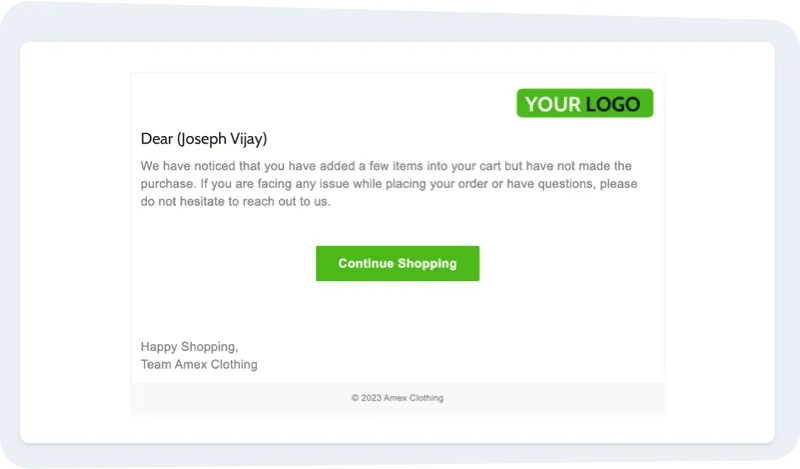
  1. The user can directly access their account via the Continue Shopping button and complete their purchase.

What happens when I uninstall this extension?

  • Your customers will no longer receive any notifications if they abandon the cart without making any purchase.

Share this article
On this page

  1. Why do I need the Abandoned Cart Extension?
  2. Prerequisites?
  3. How to Install the Abandoned Cart Extension on Zopping?
  4. How will this change affect my online store?
  5. What happens when I uninstall this extension?

Share this article

More from the blog

repeat customers
Customer Engagement & Loyalty

How to Get Repeat Customers for Your Online Store

Want more repeat customers for your online store? Here's how to turn one-time buyers into loyal regulars who keep coming back, without spending big on ads.

Tanish Bansal · 17 Sept 2026 · 9 min read

How to handle negative reviews
Customer Engagement & Loyalty

How to Handle Negative Reviews Without Losing Trust

A bad review isn't the end of your store's reputation. Here's exactly how to handle negative reviews, respond the right way, and rebuild customer trust fast.

Tanish Bansal · 10 Jul 2026 · 4 min read

How to Write a WhatsApp Broadcast That Gets Replies (and Orders)
Customer Engagement & Loyalty

How to Write a WhatsApp Broadcast That Gets Replies (and Orders)

Learn how to write WhatsApp broadcasts that actually get replies and drive orders. Get proven templates, best send times, and tips to increase conversions for your online store.

Anika Bajaj · 21 May 2026 · 9 min read

Ready to sell online with your own store and app?

Zopping is the all-in-one commerce platform for retailers who sell and deliver themselves.

See pricing
Zopping

The all-in-one commerce platform for retailers who sell and deliver themselves: online store, apps, POS, warehouse and delivery.

Email
support@zopping.com
Phone
India+91 99168 14808UK+44 7418 310190US+1 208 913 3258
Office
Zopping Technology Private Limited2078, 24th Main Rd, Vanganahalli, 1st SectorHSR Layout, Bengaluru, Karnataka 560102

Product

  • Online store
  • Point of sale
  • Order management
  • Inventory
  • Purchasing
  • Delivery
  • All features
  • Pricing

Industries

  • Grocery
  • Meat & fish
  • Restaurants
  • Pharmacy
  • Fashion
  • Electronics
  • Jewellery
  • Furniture
  • Books
  • Pets
  • Automobiles

Systems and solutions

  • OMS
  • WMS
  • DMS
  • PIM
  • CRM
  • Helpdesk
  • D2C brands
  • Wholesale & distribution
  • Multi-store & multi-city
  • Quick commerce
  • Enterprise

Company

  • About us
  • Why Zopping
  • Contact
  • Developer portal
  • Blog
  • Privacy policy
  • Terms & conditions

© 2026 Zopping Technology Private Limited. All rights reserved.

  • LinkedIn
  • Instagram
  • Facebook
  • YouTube